

SEO stands for Search Engine Optimisation - tweaking your website so it ranks higher in search results. Rank higher, and more people click through to your site, which usually means more leads, sales or ad revenue. The good news for beginners: most of the tools you need to do this properly don't cost anything.
This guide covers the free tools worth knowing, organised by what they're actually for, plus a practical order to use them in if you're starting from scratch.
On-page SEO vs off-page SEO
SEO splits into two broad categories, and it's worth knowing the difference because the tools for each are different too.
- On-page SEO is everything you control directly - your site's code, content, speed and structure.
- Off-page SEO is everything that happens elsewhere that affects your ranking - mainly other sites linking to yours.
On-page splits further into technical SEO (is the code sound, does it load fast, can search engines actually read it) and content SEO (is what's on the page actually what people are searching for).
Technical SEO tools
Search engines - Google especially - favour websites that are technically sound, because that's what gives visitors the best experience. Badly formed code can slow a page down, break its layout, or stop search engines reading it properly at all.
Google Search Console
If you only use one tool from this entire list, make it this one. Search Console is free and shows you, directly from Google: which of your pages are indexed, which have errors stopping them being indexed, your actual search rankings and click-through rates for real queries, mobile usability issues, and Core Web Vitals scores. Verify your site, submit your sitemap, and check back regularly - it's the closest thing to a direct line to how Google sees your site.
W3C Validator
Run your pages through the W3C validator to check your HTML is well-formed. It flags actual errors and suggests fixes. If you don't have coding knowledge yourself, this is worth handing to a developer along with the specific errors it reports.
Google PageSpeed Insights
Tests how fast a page loads and scores it against Google's Core Web Vitals - the speed/responsiveness metrics that factor into ranking. It'll call out specific problems: unoptimised images, render-blocking scripts, missing next-gen image formats. If you get the "serve images in next-gen formats" warning, our Responsive Image Generator converts an upload straight into WebP/AVIF plus the HTML to use them.
Rich Results Test
Google's Rich Results Test checks whether your structured data (schema markup) is valid and eligible for the enhanced search results - star ratings, FAQ dropdowns, article cards - that stand out in the results page. Paste in a URL or raw code and it tells you exactly what's wrong, if anything.
Keyword research tools
Content SEO comes down to using the words and phrases people are actually searching for. Not just single keywords - keyphrases, the multi-word searches that match real intent. Get this right and your content naturally lines up with what people are typing into Google.
SEO Review Tools' keyword tool
Enter a keyword and target country into SEO Review Tools and it returns a list of related phrases people search for, along with monthly search volume. Favour the higher-volume results - that's where the traffic is.
Google Keyword Planner
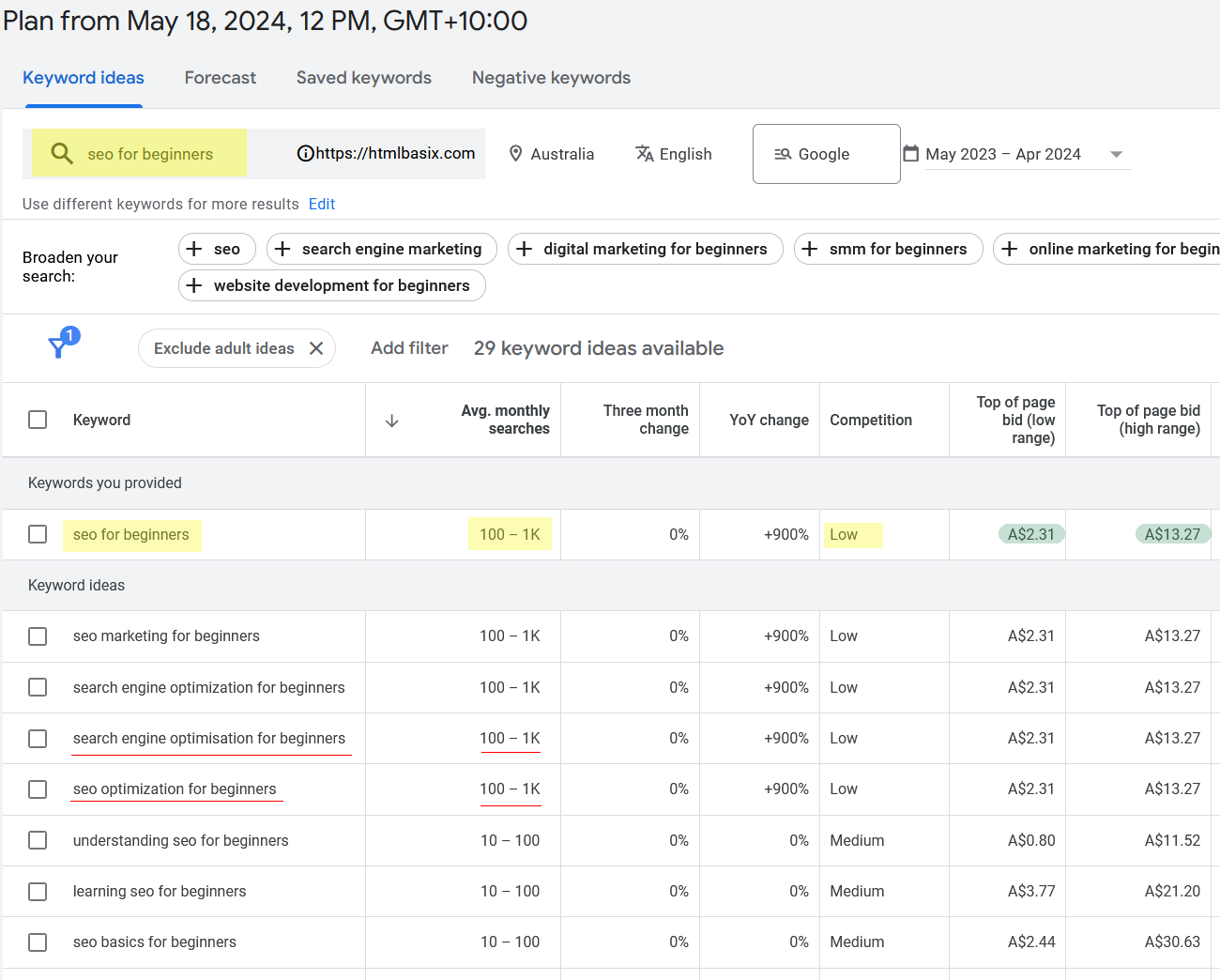
Google Ads' Keyword Planner (Google Ads was formerly called Google AdWords, if you've seen the older name around) is built for setting up paid campaigns, but you can use its research tool without spending a cent - sign up for a free account, then go to Tools -> Planning -> Keyword Planner. Enter a keyphrase - your page heading is a good starting point, since that should already be your target keyword - and you'll get search volume plus a competition rating.
In the example below, searching "seo for beginners" shows 100-1,000 monthly searches with low competition, and the related keyword ideas ("search engine optimisation for beginners", "seo optimization for beginners") return similar numbers - all worth working into the page's content. The "top of page bid" column doubles as a rough signal of commercial value: if you run display ads on your site, higher bids on a topic often mean better ad revenue for that content too.
Google Trends
Google Trends shows whether interest in a topic or keyword is rising, falling, or seasonal. Useful for deciding whether to prioritise a topic now, or timing content around when people actually search for it each year.
Your own Search Console data
Once your site has some history, Search Console's Performance report shows the exact queries people already use to find you - including ones you rank for on page two or three, which are often the easiest wins since you're already partway there. This is free, first-party data about your own audience, which makes it more reliable than any third-party estimate.
Content and structure tools
Meta tag generator
Title tags and meta descriptions are what actually show up in the search results - get them wrong and even a well-ranked page gets skipped over. Our Meta Tag Generator builds title, description and Open Graph/Twitter tags with a live preview of how they'll look.
People-also-ask research
Search "site:google.com [your topic]" or check the "People also ask" box on a real Google results page for your target keyword - it's a free, direct list of related questions people are asking, which double as FAQ section ideas and make your content match search intent more completely.
Off-page SEO tools
Off-page SEO is mostly about backlinks - other sites linking to yours. Search engines treat inbound links as a vote of confidence, particularly from sites relevant to your topic.
Google Search Console's Links report
Shows you exactly which sites link to yours, and to which pages - free, and it's your own real data rather than a third-party crawl estimate.
Free backlink checkers
Ahrefs and Moz both offer limited free backlink checkers that show a snapshot of who links to a competitor - useful for a rough idea of what you're up against, even though the full tools are paid.
A practical order to work through this
- Set up Google Search Console first and submit your sitemap - everything else is easier once you can see how Google actually views your site.
- Run PageSpeed Insights and fix the technical issues it flags.
- Research keyphrases for your most important pages using the Keyword Planner and SEO Review Tools.
- Update your title tags, meta descriptions and page content to match what you found.
- Check back in Search Console after a few weeks to see what's actually moving.
Frequently asked questions
What's the single best free SEO tool for beginners?
Google Search Console. It's free, it's first-party data straight from Google, and it covers indexing, rankings, mobile usability and Core Web Vitals in one place.
Do I need to pay for SEO tools to rank well?
Not to get started. The free tools above cover technical checks, keyword research, and backlink visibility - enough for most beginners. Paid tools mainly add scale (crawling thousands of pages, deeper competitor data) rather than capability you can't get for free at a smaller scale.
Is Google Ads' Keyword Planner really free to use for research?
Yes - creating an account and using the keyword research tool doesn't require you to run or pay for any ads.
How long until SEO changes show results?
Typically weeks to a few months, depending on how competitive the keyword is and how established your site already is. Search Console lets you track movement in the meantime rather than guessing.